Pages

Showing posts with label Retro. Show all posts

2015-06-17

A/UX on real hardware

So, I've been playing about with Unices on some old 68k Apple hardware. NetBSD supports the hardware fairly well, but I found it was fussy about the various SCSI to IDE/CF-card adapters available. In the end, SCSI2SD seems to be the best overall, with MacOS, NetBSD and Linux all working fine with this. Definitely recommended for old kit.

I prepared an EMILE based bootable ISO of the latest m68k Linux release. This got to the installer on my Quadra 610, but failed to get that far on my LC III. I thought I'd try something else.. A/UX. And it worked! I had to use a real CD-ROM drive. For some reason, the CD-ROM emulation provided by SCSI2SD is enough to get Linux to boot, but not enough to get an HFS CD-ROM image to mount under MacOS. In the end I bought a CD-ROM drive off eBay, and added the suitable "System Enabler" to the A/UX install floppy. And it worked!


If I get an external case for this CD-ROM drive, or just buy a suitable external Apple SCSI CD-ROM drive, I could try to install A/UX on my LC III. The LC III is listed as unsupported, as A/UX needs an FPU - well, I added one to mine, so it's worth a shot. The LC 475 is supported, I'm not sure how different these are in terms of on-board devices.

2015-05-20

Things!

Things have been happening.

I finally got around to installing the Ultimate 1MB from Lotharek into my PAL Atari 65XE. It looks like this:


Yes, those broadcast antennae, one carrying the system clock, actually work. It's a neat system, which emulates multiple RAM expansion systems and multiple ROMs too. It's very easy to install, though you have to piece together the instructions yourself, as there have been multiple variants of this board. This is the latest, and is actually very easy, only requiring soldering four wires, and a couple of sockets. Most of the time was spent soldering and crimping some Dupont connectors for the headers. My board has rather obviously had some previous upgrades and repairs done to it.

I also bought two SIO2PC cables, one RS232C-based from eBay, the other USB based from Lotharek. I used these to log into a BBS using the ICET software on the Atari, logged into my ThinkPad X201 running Ubuntu MATE. The AspeQt software suite is very neat, allowing simulating Atari drives from disk images or file system folders, so you can cross-develop on a modern machine, test and debug under an emulator, but also very easily test on real hardware.


I also repaired, not one, but two Commodore Plus/4 computers! One was the only computer from my childhood to survive various purges at my Mum's house. It is the computer I used the least *as it was broken back then*. It had a faulty BASIC ROM. I had planned to put in an EEPROM, which I ordered, but decided to just get a replacement original ROM. I should replace the electrolytic caps in this. The PSU suffered damage in shipping. I re-soldered the big capacitor that had been rattling around. Luckily I checked the output voltage before plugging it into anything. It was spitting out about twice the voltage it should have been, so I cut the cord and threw the PSU out. I used the cord to make an adapter for a C64 PSU.

The other +4 was one I bought on eBay. I socketed all the chips on this, replaced all the electrolytic caps, and replaced the one faulty IC - a buffer, that I eventually tracked down.

I added some heatsinks to both +4s and they are running fine. I even loaded some games from tape, though I will mostly be using the sd2iec with these. If I can find time, I want to play the port of Magic Candle on these old machines. The video output is much, much better than my C64c (which I probably need to look at).

I also re-capped a Mac LC I, but it seems too late, as it is forlornly giving the chimes of death, indicating a RAM failure. I just picked up an LC II mainboard from eBay for 5GBP as a replacement. It will be re-capped. An LC III that was squealing with bad caps was repaired and now runs fine. I also re-capped a Quadra 610 that seemed to be running fine, but in fact had slight leakage from the caps.

I went through a couple of SCSI->SATA interfaces and didn't have any luck installing NetBSD until I tried the SCSI2SD interface. It works. If you're looking at 50 pin SCSI adapters for retro systems; look no further. The SCSI2SD interface seems to be the most compatible.

Last night I finally got around to trying out the revived m68k Debian, using the scsi2sd's abilities to emulate multiple disks, including a CDROM.

On my LC III, it booted:


Loaded the kernel:


Got the kernel running:


And then got stuck:


But at least I got to see Tux on real hardware.

This morning, whilst waiting for builds, I tried things out on my Quadra 610. After a false start due to dumb incorrect termination of my SCSI bus, things went more smoothly:


The Installer!


I don't have that many compiles to wait for, so I'll have to get back to this another time...


Other things I've been up to:
Bought two HBI-232 serial interfaces for my MSXes.
Bought 2 Z88s and bits for them. Lots of support for these cool machines now!
Bought an updated DIVIDE 2k14 for my Spectrums.
Bought a Spectrum 48+, and of course a new membrane for it.
Bought the SPECTRA interface for the Spectrums with ROM interface and ZXC4 flash ROM - excellent video quality
Bought the Interface 1bis for the Spectrums
Bought an SGI O2, and an SCA (SCSI)<->SATA adapter.
Bought an HP 380DL G5 server, upgraded the processors to X5470s, RAM to 32GB
Bought an HP Z800 workstation, upgraded the processors to X5670s, RAM to 64GB
Bought an Amstrad NC100 - will put ZPC on it
Bought a couple of Raspberry Pi B+ 2's (of course!) and some bits for them. Set up RetroPi on on SD card & USB stick combo "for my daughter" so that I don't have to keep swapping out an Atari/MSX/C64/Spectrum depending on which game she wants to play.

I'm sure there's some random hackery I've forgotten...

I've still got to add the VXBE video and stereo POKEY upgrades to my 65XE, and I'm tempted to paint the case. I'm also tempted to do a custom Spectrum case.

But, I'm done with purchases for now, and have plenty of ideas for retro projects. Well, maybe I'll buy a backup C64. Clearly I'm missing a Spectrum 128... And if anyone is selling a Sun 3/80, I'd be interested.

Edit: Oh yes, finally got around to fixing the video on my Toshiba HX-20 (MSX). It was a dodgy video RAM chip, as I suspected. I have captured some video output from the Toshiba, the Yamaha CX-11 and the Sony HB-1FXDJ to compare them. I made an RGB cable that works with both the Yamaha and the Sony, and the video quality is excellent.

I captured the "bad cap scream" from my Mac LC III. I'll upload that at some point.


2013-10-22

Using Radial capacitors instead of Axials

This video shows a nice way to use radial capacitors in place of axials. Radials are cheap and easy to find. Axials are getting more tricky to find, but are common in some old kit.

http://www.youtube.com/watch?v=TeCVt2T-YSo


Oita trip - part 1

Short note.

Usually I keep track on Yahoo Auction in Japan for astronomy related stuff, especially rare optics, something I'm sure my wife wishes I would stop. However, this time I decided on getting a retro computer. Originally I was considering a SORD M5, but didn't like the mad prices. I initially decided on a Toshiba HX-10 - a pretty canonical MSX.

However, I went on a bit of an MSX frenzy.

First I got a Toshiba HX-20, with broken video output. I suspect it's most likely the video RAM, but it could potentially be the ROM holding the character set (unlikely, as the thing boots), the video chip itself, or (hopefully not) some custom logic chip. I liked the idea of fixing this up, and also getting an extra slot over the HX-10. I'll probably replace all the caps, and maybe some of the regulators with more modern versions that spew out less heat. It also needs a good clean.


Then I decided I wanted a higher end machine, too, an MSX2+. I ended up getting into a bidding war on a very nicely restored Sony HB-F1XDJ. It's been re-capped and very well cleaned. I avoided the Sanyo and Panasonic kit as they were extremely ugly (even if some of the specs were better).


The guy who restored it has a thing for old computers, and has a blog. Amusingly, he got a couple of keys out of place when he put the keyboard back together, so I'll have to fix those. Those who like boxed, pristine computers will not like the fact that I'm going to remove that fugly sticker, and also most likely hack the internals to add more RAM. This thing is about the size of an Amiga A500, maybe a little smaller.

The keyboards on both of these machines are pretty nice mechanical keyboards. Not something you can say for many 80's home computers.

These both arrived before I left Japan, so I was able to bring them back with me. I also bought a Yamaha CX-11, which arrived the day after I left and will be sent on.

Note: the Sharp X-68000 series is way cool. I must resist.


I took my Vixen Sphinx SXW mount with me. I've only used this a few times in the past couple of years, the most memorable time being at a public outreach event with TASOS. I've tried selling it before, but found it hard to get a decent price locally, and it's kind of heavy and not high-end enough to ship internationally. So, having previously purchased the GINJI 200FN, which is over the limit for my Vixen GP, both kept at my in-laws in Japan, I decided to take the SXW and leave it there. No need for a tripod as the tripod I have for the GP works for the SXW, and the half-pillar, which I also took.

In the photo above, there are various Borg bits in the focusser. I must have been faffing about with the Baader MPCC or something, as no extension tubes are needed to get focus with the Pentax XW20.

There will be a separate post about my experiences with this mount.


2011-09-17

Reviving a classic

I recently bought a couple of ZX Spectrum 48k computers from eBay. My first computer was a Spectrum (speccy) 48k+.

One of the 48k's is in great condition, the other, while working fine, was a little shabby, though not too bad. The keyboard sensitivity was not 100%, but OK.

I decided to clean up the shabby one.


It had been repaired, at least twice, with little warranty stickers added. This little speccy was in use until at least 1992.


Keyboard

Removing the keyboard was a pain. The ribbon cables for the keyboard membrane were stuck in the connectors. It was almost as if they had been glued, but is most likely due to the material degrading over time. The cables were very brittle and tore as I was removing them.


Removing the broken cable was also a bit of a pain. I cleaned out the connectors.


This one little screw holds the circuit board onto the bottom of the case.


Quite a few of the RAM chips, including the video DRAM are socketed, and do not match the originals. These must have been replaced.


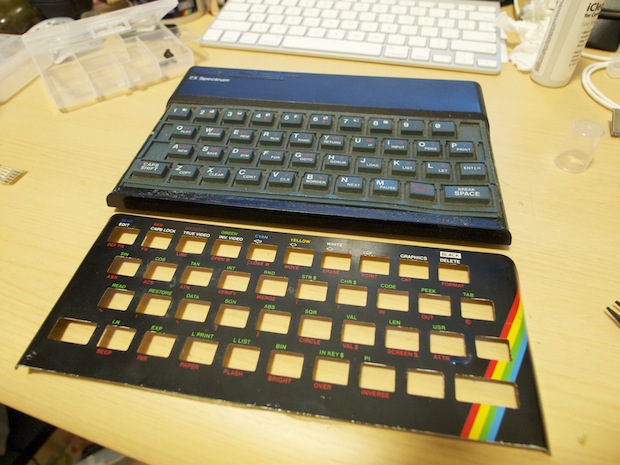
As the metal faceplate was already loose it easily came off, revealing a keyboard with years of dust, but otherwise OK.


The keyboard popped off easily to reveal the membrane.


I found a retro site selling parts, including brand new faceplates, keyboards and keyboard membranes.

http://www.dataserve-retro.co.uk/


You can even get replacement kits for the little rubber feet of the ZX81, 48k and 48+.


After cleaning up the top of the case, attaching the membrane and keyboard was easy.


Then the faceplate. It's not stuck down in this photo.


The new faceplate isn't quite as nice as the original. The font isn't as bold, and the colours less saturated, with the result that the keywords are less easy to make out. Also, the spectrum logo is a bit off. However, more importantly, the new faceplate is a perfect fit.

Video

Now time for the video modification. Unlike more expensive computers of the era, the speccy 48k did not include output for a monitor - neither RGB nor composite. The only output was a UHF/VHF RF signal for use with a TV. This is a pain, as the frequencies used are now allocated for other channels. So, the speccy cannot be used well as-is with a TV or TV capture card. Fortunately, the composite video signal is fed into the modulator, and a simple modification is all that is required to get a composite signal output. The original TV out socket is a standard RCA socket, so "normal" RCA composite cables can be used without changing the socket.

I followed the instructions here:

http://womblesretrorepairshack.blogspot.com/2008/11/zx-spectrum-composite-video-mod.html

Popping off the top of the modulator box shows a resistor connected to the centre pin of the TV out socket. This carries the RF output signal.


The side view shows the composite video signal being fed into the modulator on the left, and +5v power on the right.


Desoldering these three is not hard, even for me.


Then, all that's required is to connect the composite signal to the centre pin of the TV out socket. The modulator shield is grounded, so no change is needed here.

Not the world's best solder job, but it will do.


I quickly hacked up a composite video cable and... it didn't work. It didn't work because my PSU was set at 6v, not 9v. Doh.


Video quality is not great. There are some more hacks to improve video quality, and even provide S-video output, at this site:

http://user.tninet.se/~vjz762w/rebuild.html

I'll probably get around to doing these one day.

Tapes?

I think the last time I used a cassette was copying a Japanese language test (to MiniDisc!) back in 2001. It's the 21st century and I don't really plan on reliving the "fun" of tapes. So, I bought a DivIDE interface from this guy:

http://www.lotharek.pl/


It works great. The default ROM is FATware which allows loading snapshots (SNA, Z80) and emulating tapes (TAP). It would be even better if it provided the ability to save snapshots. This and more are provided by ResiDOS, but this requires more RAM than the 8k the DivIDE interface provides. DivIDE+, Spectranet and the ZXCF and similar interfaces are all capable of running ResiDOS. As far as I'm aware there is nowhere to buy these pre-assembled. The ZXMatrix looks far, far beyond my abilities to build. The spectranet interface is still under development and looks very promising.

I also bought the Garmin "iMic" USB audio interface, so that I can save to/load from my iMac if necessary.


The finished article. Ready for another 30 years. Maybe.